Signs That May Indicate a Security Risk

When you get into established habits and routines, you may not notice subtle changes and warning signs of underlying issues until it’s too late. It’s always best to have a robust cybersecurity policy on the books, and to review it regularly with all staff and stakeholders. But in today’s age of AI tools and quick help shortcuts, the pressure to increase productivity while decreasing costs may lead to poor decision making that may expose your proprietary data to cybercriminals.

If it’s been a while since you reviewed your business tools and technologies, now is the time. Take a step back, and see if you notice any red flags. Here are a few signs to look for:


Employees using unknown or unapproved tools to streamline their workflow


“Work smarter, not harder,” as the saying goes. If the job gets done, what’s the problem? Well, the problem is that not every tool and app is safe to use, and even those that are can still be misused, creating major privacy and security issues not just for your business, but your clients and stakeholders as well.

Workarounds like this don’t mean your employees are careless. It just means you your systems aren’t meeting their needs. It’s important to ensure that everyone understands proper and improper technology use for work. But perhaps more important is to have a system in place that allows employees to raise technology issues, discuss options, and implement IT-approved solutions safely.


Your outdated software or systems no longer receive updates


Software vendors don’t support their products forever. Eventually, older versions reach “end of life,” meaning no more security patches, bug fixes, or technical support. When that happens, your existing technology becomes vulnerable to glitches and cyberattacks.

“If it ain’t broke, don’t fix it” may seem like a cost saving in the short term, but running these systems beyond their intended life cycle will cause costly, potentially catastrophic issues down the line.  If you’re still running these systems, you’re operating with known vulnerabilities that will never be fixed. And that risk compounds when these legacy systems connect to newer tools.

Audit your software and infrastructure regularly to ensure your technology remains up to date. If a major update is required, don’t leave it until a major disruption forces your hand. Plan a gradual phase-out of old systems before they become critical vulnerabilities. And always work with your IT team to test upgrades and replacements to minimize impact during the transition.


Loose or inconsistent data access rules

You wouldn’t just give a stranger the keys to your house. The same rule applies when it comes to who can access sensitive data and when. Access control vulnerabilities happen when:

  • Permissions are never reviewed or updated when employee roles change
  • Shared accounts or generic logins are used across teams
  • Onboarding and offboarding processes don’t include access audits

Implement role-based access controls and establish a regular review process. Encourage and enable individual rather than shared logins, and the use of password keepers that auto-generate strong, secure passwords. Always audit access points and rules when someone is onboarded, offboarded, or changes roles within the company. Enable multi-factor authentication (MFA) where available to add a layer of protection.


Your Systems Don’t Talk to Each Other—or They Talk Too Much


Integration issues create security risks. When systems aren’t properly integrated, manual data transfers (copying, exporting, manual entry, etc.) increase the risk of errors, leaks, and exposure. When too much unnecessary data is shared between systems without proper controls, a breach in one area can snowball across your entire system, and one compromised account can become a gateway to everything else.

Map out and conscientiously plan your data flows. Understand where information comes from, where it has to go, and how it needs to get there. Are those connections secure? Is the data transfer needed in the first place? Automate data sharing within controlled environments as much as possible. This not only reduces risk, it also improves workflow efficiency.


You don’t know your company’s IT policies

If someone asked you right now, “How often is the database backed up?” or “Who all has access to the accounting system?” could you answer confidently?

If you don’t know, or need to run reports or consult with someone to find out, you have a problem. When you don’t have clear insight into the systems and IT structures that keep your business running, you can’t tell if or when something becomes an issue. You’re flying blind.

Invest in monitoring and logging tools that provide real-time visibility into your information systems. Establish regular reporting on access, backups, and system health. Make sure someone on your team owns security oversight and knows how to interpret the data.

None of these warning signs mean your business is doomed or that you’ve been negligent. But ignoring them won’t make them go away. If you have concerns about your business systems, whether it’s efficiency or security, Nerd Crossing can help. Sometimes, taking an honest look at what works and what doesn’t can expose opportunities for streamlining and growth. Let’s talk.

Zen and the Art of System Updates

Android phone in update mode

You wouldn’t skip oil changes for your car and expect it to run smoothly. The same applies to the technology you and your business use every day. System updates often feel like an interruption to your work, but they are essential for keeping your devices running smoothly.

What Regular Updates Do

Improve security:

Cybercriminals are constantly evolving new ways to infiltrate your systems and steal your data. The advent of artificial intelligence (AI) has accelerated the development of new scams and malware, and regular system updates are vital for keeping businesses safe from cyberattacks. When a vulnerability is discovered, tech companies and vendors use these updates to release patches that seal those weak points and protect your systems—and, more importantly, your data.

Improve performance:

Is your device running slower than usual? Does it take longer to start up? Odds are, there is a system update waiting in the wings to fix it for you. These updates aren’t just for security. They also fix bugs, optimize operations, and tweak your system to help it run smoother and faster.

Fix compatibility issues:

As new apps, devices, and integrations are released, your operating system needs to keep pace. Regular updates ensure that your technology continues to play well together and you avoid any potential issues that may bring your operations to a standstill.

When was the last time you dusted off your technology?

Most consumer-level devices these days have automatic update capability. Enabling this feature is the best way to ensure that your device continues to function correctly and securely. If you can’t allow your device to shut down or restart for these updates during the workday, you can set the automatic update to take place outside of work hours. These small habits will make a big impact on your technology usage.

The same applies to businesses and organizations, too. Most small businesses and many large businesses rely on employees using personal devices to perform their duties, whether they work at the office or from home. Regular, automatic updates should be company policy for all business-related technologies.

Need some help keeping your company up to date?

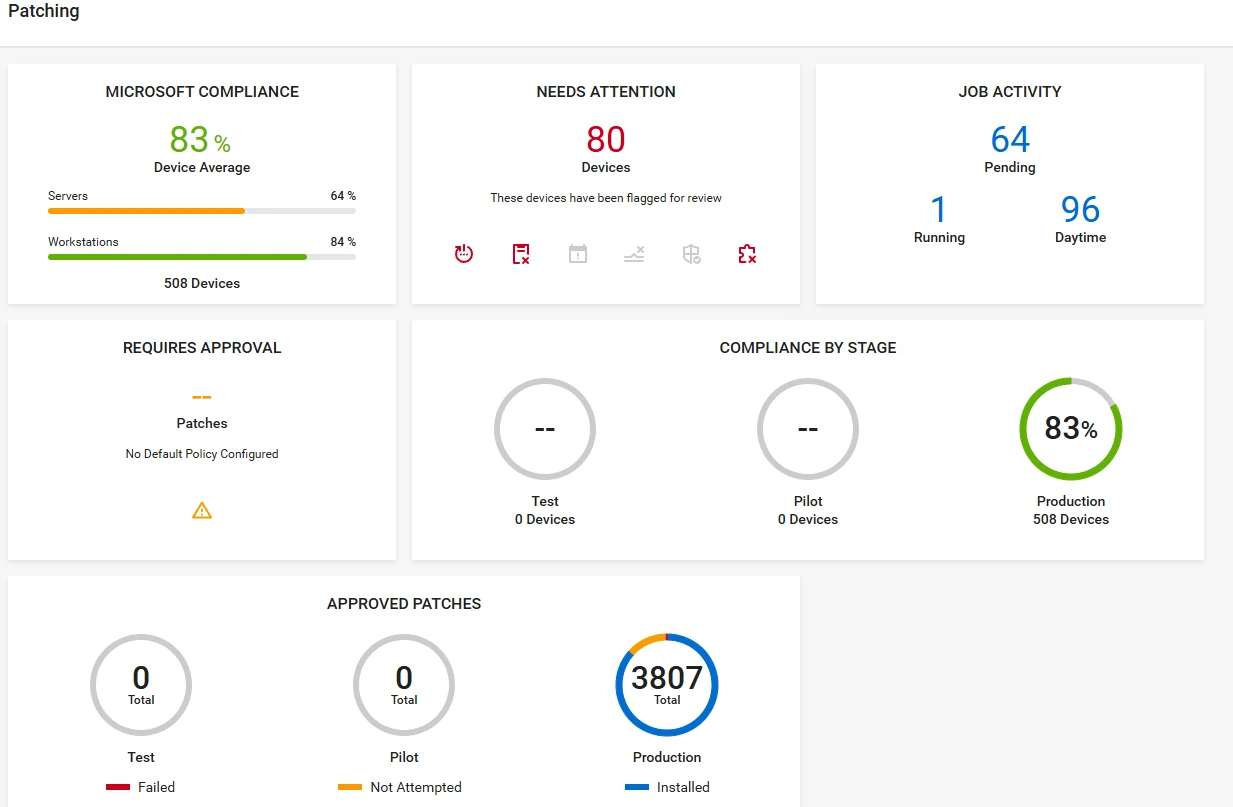
systems update dashboard screenshot showing multiple metrics and status callouts

When it comes to balancing the need for maintaining security and minimizing service disruption, things get a little more involved. You don’t want to cause major issues for your organization. Nerd Crossing can help! Technology updates are included as part of our Maintenance Plans with an automated patch management system that keeps our clients’ systems secure and running smoothly. Want to know more? Let’s connect and chat about what you need, and how we can help you make it happen.

Tips for Keeping Your Computer Healthy

Whether you have a new computer or are running an older system, we wanted to share our tips for keeping your computer healthy. Here are some simple tips to help you keep your computer running as smoothly as possible.

Continue reading “Tips for Keeping Your Computer Healthy”

Don’t Be a Password Dinosaur

I’m sure you’ve heard this a million times, but it’s so incredibly important that we’re saying it again. Get better passwords! The list of the 25 most popular passwords of 2014 is available and it’s a doozy.

Continue reading “Don’t Be a Password Dinosaur”

Don’t Get the Blue Screen of Death!

If you have Windows, you know what the “blue screen of death” or BSOD is. This is usually caused by severe hardware issues with the computer’s driver software. The blue screen can have horrible and frustrating effects, such as data loss and the computer failing to restart properly. Continue reading “Don’t Get the Blue Screen of Death!”

Technology Tips & Tricks

Almost daily, we provide our social media viewers with tips & tricks for technology and computer care. We’ve bundled up a few of them here, but please make sure to follow us on Facebook and Twitter to get your daily dose!

Continue reading “Technology Tips & Tricks”

Protect Your Online Information

It’s important to know how to protect your online information. While millennials don’t seem to care much these days about their online privacy and information, as time goes on, they’ll rue the day they decided to post that college party selfie or tweet that asinine observation. But our online presence goes beyond posting photos and superfluous missives — it holds our identity. Continue reading “Protect Your Online Information”

Tech Tip: New Microsoft Patches & Updates

On December 9th, Microsoft released a batch of security patches for several of their products. Three critical (and seven total) updates affected Internet Explorer, Microsoft Exchange, Microsoft Windows, and Microsoft Office. All one needs to do to update their system is accept the update on your computer through its notification. These updates will require a restart to finish the installation. Continue reading “Tech Tip: New Microsoft Patches & Updates”

Windows 10 is Coming…

It seems as though Microsoft Windows 8 came and went in a flash. Currently on 8.1, Microsoft has announced that Windows 10 (they’re skipping version 9) will be released in late 2015. While many users are still using Windows XP, most who have tried (or read about) Windows 8 prefer to use the version before — Microsoft 7. Windows 8 caused quite a stir with its release, as many users were frustrated that the new design was not intuitive and did not provide the Windows feel and appeal. The hurried release of Microsoft 10 comes from complaints and criticism of Windows 8. Version 10 will still have a touch user interface option but will also include elements that many adored in older versions.  Continue reading “Windows 10 is Coming…”

Shellshocked

shellshock blog

A new security threat has been discovered–Shellshock, also known as the “Bash bug” for affecting the Bash program in Linux and Unix systems. You may have heard of this as it has been compared to Heartbleed, the virus that hacked into data on millions of computers this summer. The main issue that system administrators are experiencing with Shellshock is that it affects “a common bit of code that is used all over the place,” according to Robert Graham, security expert and CEO of Errata Security. Currently, nobody knows exactly how to fix Shellshock and solving the overall problem has been estimated to take months to years, though security companies and even the US Department of Homeland Security have been releasing patches to help aid affected servers.   Continue reading “Shellshocked”