Zen and the Art of System Updates

Android phone in update mode

You wouldn’t skip oil changes for your car and expect it to run smoothly. The same applies to the technology you and your business use every day. System updates often feel like an interruption to your work, but they are essential for keeping your devices running smoothly.

What Regular Updates Do

Improve security:

Cybercriminals are constantly evolving new ways to infiltrate your systems and steal your data. The advent of artificial intelligence (AI) has accelerated the development of new scams and malware, and regular system updates are vital for keeping businesses safe from cyberattacks. When a vulnerability is discovered, tech companies and vendors use these updates to release patches that seal those weak points and protect your systems—and, more importantly, your data.

Improve performance:

Is your device running slower than usual? Does it take longer to start up? Odds are, there is a system update waiting in the wings to fix it for you. These updates aren’t just for security. They also fix bugs, optimize operations, and tweak your system to help it run smoother and faster.

Fix compatibility issues:

As new apps, devices, and integrations are released, your operating system needs to keep pace. Regular updates ensure that your technology continues to play well together and you avoid any potential issues that may bring your operations to a standstill.

When was the last time you dusted off your technology?

Most consumer-level devices these days have automatic update capability. Enabling this feature is the best way to ensure that your device continues to function correctly and securely. If you can’t allow your device to shut down or restart for these updates during the workday, you can set the automatic update to take place outside of work hours. These small habits will make a big impact on your technology usage.

The same applies to businesses and organizations, too. Most small businesses and many large businesses rely on employees using personal devices to perform their duties, whether they work at the office or from home. Regular, automatic updates should be company policy for all business-related technologies.

Need some help keeping your company up to date?

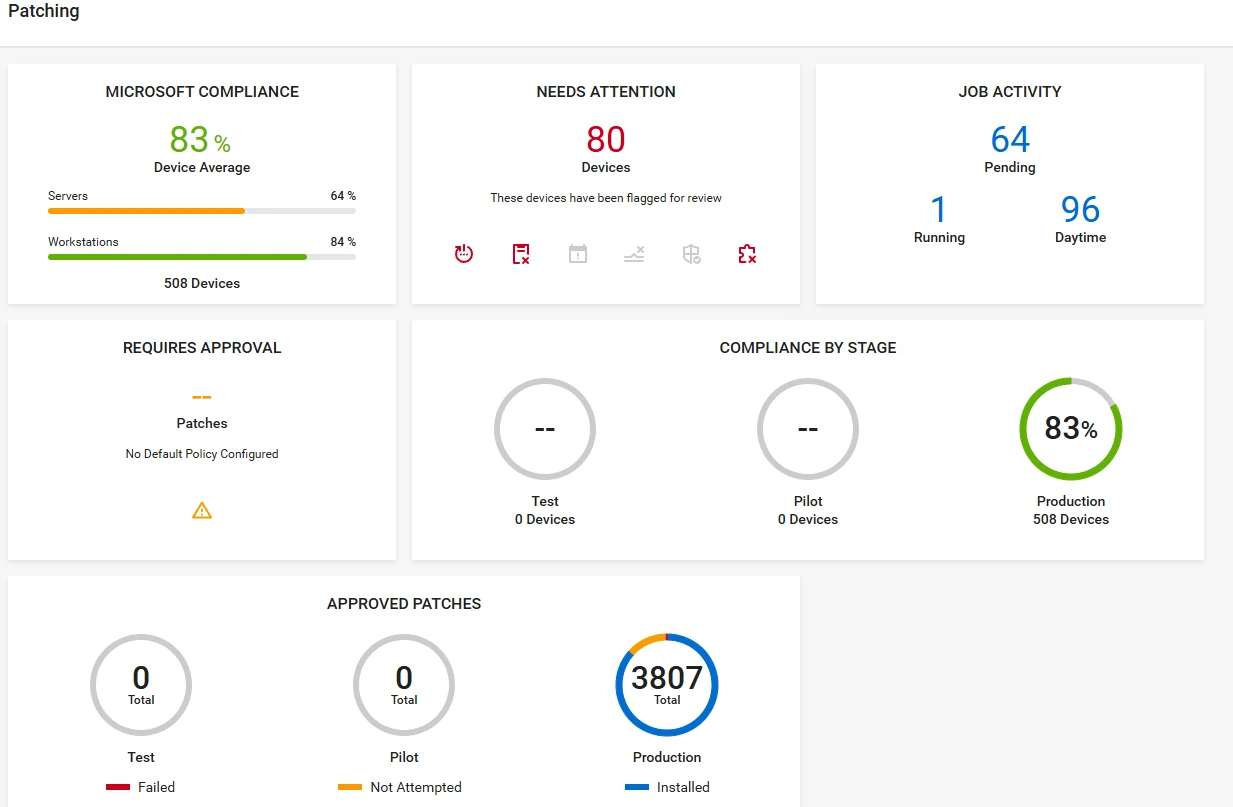
systems update dashboard screenshot showing multiple metrics and status callouts

When it comes to balancing the need for maintaining security and minimizing service disruption, things get a little more involved. You don’t want to cause major issues for your organization. Nerd Crossing can help! Technology updates are included as part of our Maintenance Plans with an automated patch management system that keeps our clients’ systems secure and running smoothly. Want to know more? Let’s connect and chat about what you need, and how we can help you make it happen.

Domain Names: How Not to Lose Them

Picture this: You get an email notification about your domain name expiring. You mark it as Read and move on with your day. Two months later, your friend asks you what happened to your website—it’s not working anymore.

Turns out, you never acted on that notification. Your website domain name registration expired, and someone else bought it. You just lost your website, your branded email, and access to all accounts that you set up with it.

Now what?

You don’t own a domain. You rent it.

When you purchase a custom URL, you don’t own it indefinitely. You rent it for a set period of time. If you want to keep it, it’s up to you to renew it when the term expires. If you forget, you could find yourself in a world of trouble. Expired domains go to auction and can be bought by anyone. And once they have your branded URL, they could hijack your brand to spoof your business, or even hold the domain name for ransom, forcing you to pay whatever they ask to get it back.

This is not a scare tactic or an urban legend. It’s a real-world issue that happens every day, and affects thousands of people and small businesses, costing not just money, but SEO power and brand reputation, too.

How to protect yourself

Luckily, this is 100% preventable. To protect your business website and related services, follow the steps below:

Register your domain with a reliable registrar
Always make sure you’re dealing with a reputable service provider like GoDaddy or our personal go-to,Namecheap, to register your domain. Set up your account, and make sure your information is kept up to date.

Register for multiple years
If you have an option, always register for as long as you can. This not only reduces maintenance work, but may also save you some money, as longer term registrations offer a per-year discount.

Activate autorenewal
The best way to make sure your website URL doesn’t expire is to make it renew automatically. You will still receive a notification of renewal each time but, as long as your payment information is up to date in your account, there is no further action required. Speaking of which…

Keep your payment information up to date
It goes without saying that renewals must be purchased. If your payment information expires or changes and the charge can’t go through, you may still lose your website URL. Make it a habit to go through all of your accounts and update your payment information whenever you change your default payment method or get a new credit card.

Read your registrar’s communications
Your service provider will send you periodic updates via email. Keep an eye out for these, and always read through them to make sure you don’t miss anything. Regularly opening these emails will also help prevent important notices being sent to Spam.

Need to spruce up your website?

Your website is your online business card and portfolio. It’s the first thing users see when they look you up. Does your website communicate the right message to potential customers? If you need help updating your online image, we’ve got you! Contact us today for a free consultation.

ADA and Lawsuits Against Non-Compliant Websites

high-angle-view-of-disabled-man-on-wheelchair-using-laptop

ADA and Lawsuits Against Non-Compliant Websites
Every business has a reputation to uphold, and part of what feeds into that reputation is whether or not a website is compliant with the Americans with Disabilities Act (ADA). Having a non-compliant website is not a good look, and there are many lawsuits that show what can happen when a website isn’t geared towards inclusion.

Americans with Disabilities Act Explained
Earlier waves of the civil rights movement have focused on protecting the rights of men and women, regardless of what ethnicity, race, religion, or sex they were. In 1990, there was a push for also defending the rights of those with different abilities, which resulted in the creation of the ADA. The ADA impacted and influenced all aspects of how organizations were run and promoted possibilities and opportunities for those with disabilities.
The ADA focuses on protecting the rights of disabled people in the workforce by making the workplace physically accessible for everyone regardless of ability. Outside the workplace, the ADA prioritizes the following areas:
● Transportation
● Public accommodations
● Communications
● Accessibility to state and local government programs and services

ADA and Websites
As helpful as it is that the ADA has ensured businesses have accommodations such as wheelchair-accessible ramps, there is little guidance when it comes to website accessibility and compliance. This means that in court cases, it’s up to the court to decide if the websites are compliant or not, without a framework to operate with.
How does this impact you? Well, if you’re not aware of the possibility of your website being non-compliant or at risk of being perceived as such, then your business could be sued at any time. Some businesses may be able to shoulder that sort of financial burden, but unless you’re a large business with a huge profit margin and a lawyer on payroll, you most likely can’t afford to be taken to court.

ADA and website compliance in the court
With no guidance about what counts as a clear lack of compliance, courts have argued on whether or not certain online practices are considered to be in line with the ADA or not. Before
getting into the nitty-gritty of these cases, it’s important to clarify the foundational right being protected that’s up for debate when it comes to website compliance.
At the forefront of this debate whether something is ADA compliant is the general determination that access to public space is either restricted or not restricted from those with different abilities. For a while, it was up for debate whether the internet counted as such a public space, but more recent hearings seem to show a preference for determining the internet as such.
In Europe, there are guidelines to help businesses be compliant with accessibility called WCAG 2.0 AA. There are levels of compliance — AA standing for the “standard,” A for “below acceptable,” and AAA for “exceptional.” Ideally, a business would want to be between WCAG 2.0 AA and WCAG 2.0 AAA compliant.
More and more of these court hearings and cases are coming up, some more prominent than others. In total, there were over 2,000 federal cases in 2018.

Here are some examples:
1. Domino’s Pizza case
A man named Guillermo Robles filed a lawsuit against Domino’s Pizza because he was unable to use his special screen reading software in order to create his own custom pizza and place an order. The court ruled in his favor since both the Domino’s app and website didn’t score as WCAG 2.0 AA.
2. Hobby Lobby case
Hobby Lobby was sued by Sean Gorecki, who was legally blind. Using the JAWS reading software, certain aspects of the website couldn’t be read. This website was considered to be non-WCAG 2.0 AA compliant, leading to a win for Gorecki.
3. The Harvard and MIT case
Even though Harvard and MIT are known for being innovative and attracting high achievers, the prestigious schools were sued by the National Association of the Deaf as their course materials were all not accessible for those with hearing impairments. Considerations like adding captions weren’t made, and the case is still ongoing.
4. Beyoncé
Mary Condor sued the singer for her website not being accessible to her due to a lack of implementation of WCAG 2.0 AA. Condor had visual impairments and had great difficulty using a screen reader due to a lack of alt-text and keyboard accessibility.

How to make your own website ADA compliant
Now, it’s clear that none of these businesses had built their websites with the intention to make the lives of those with different abilities difficult. However, even if unintentional, it leaves you and your business vulnerable to a lawsuit. This can be avoided. For example, here are some requirements for your website to be considered compliant with WCAG 2.0 AA standards:
• The content must be written in a way that screen readers are able to translate it (this includes providing alt-text for each image, as well as incorporating keyboard access)
• Videos must include on-screen captions for those with hearing impairments
• A drop-down menu must be accessible via the keyboard as well as mouse

Those are just three major ways you can make it more accessible and potentially avoid the pitfalls that lead to court cases. However, there are many more features that can be incorporated to make your website more compliant.

Final thoughts
As a business owner, you want nothing more than for it to thrive. However, it’s always vulnerable to someone stumbling across your website and finding that it’s non-compliant with ADA standards. This can easily be avoided by simply hiring a team to work with you on your website to make all the necessary changes and implement the features that will make it accessible to everyone.
Hiring a web team like Nerd Crossing has huge benefits, including your peace of mind and protecting your business. As Nerd Crossing likes to emphasize: first impressions matter, and having your website be compliant makes for a great first impression!

IT for Construction Companies

As a leader in the Construction field, it’s important to protect your employees, customers and business through technology. Our construction-specific cybersecurity, encryption and technology services can help you with safety and productivity. Please let us know if you have any questions about the specific technology that can help protect your construction business, please don’t hesitate to contact us for a free technology consultation. Improve your company’s technology today!

Keeping Paperwork in Order

We help construction companies with the organization and secure storage of paperwork, including licensing, supplier contracts, and more.

OSHA Requirements

As technology changes, construction companies need to ensure that they are continuing to follow OSHA requirements.

Monitoring Productivity

Our technicians are familiar with software and applications, such as Fieldlens, to help monitor your job sites and productivity.

locking down school computerCybersecurity

Cybersecurity is extremely important to maintain, as it helps protect your employees, customers, partners, and business.

Contractor Licensing

Our technicians can help organize, moderate and back up construction and contractor licenses, agreements, and much more.

school infrastuctureInfrastructure

Our technicians can set up or improve both the technology infrastructure for your administrative office and temporary job sites.

data storage schoolsData Storage

Whether you use a server or the cloud, we can help manage your data storage and provide you with the most cost-effective data storage solutions.

Construction Software & Applications

Our technicians are thoroughly familiar with software and applications used for construction companies.

Tips for Keeping Your Computer Healthy

Whether you have a new computer or are running an older system, we wanted to share our tips for keeping your computer healthy. Here are some simple tips to help you keep your computer running as smoothly as possible.

Continue reading “Tips for Keeping Your Computer Healthy”

Past, Present, and Future of Technology

Technology has made incredible amounts of progress within the past 10 years. However, with all the new technology that is continually flooding into the market,we often forget that we were still using flip phones ten years ago.  Technology has come such a long way that it is now possible to use virtual reality equipment in your living room. Continue reading “Past, Present, and Future of Technology”

Wearable Technology

Wearable technology had a big year in 2015. Fitbits, Apple Watches and Samsung’s Gear 2 are just three heavy contenders fighting to be wrapped around your wrist. While most of these smart watches monitor your heart rate, how many steps you’ve taken and alert you of your exercise goals, you can also send voice to text messages and emails through Gear 2 and Apple Watch, among others.  Continue reading “Wearable Technology”

Technology Tips & Tricks

Almost daily, we provide our social media viewers with tips & tricks for technology and computer care. We’ve bundled up a few of them here, but please make sure to follow us on Facebook and Twitter to get your daily dose!

Continue reading “Technology Tips & Tricks”

Why IT Matters for Businesses

If you’re a business owner, then you’re aware of how stressful it can be to take care of everything in your company. Most businesses can’t afford their own marketing, technology or design departments. Or they’re small enough that they only need these services a few times a year. That’s why companies like Nerd Crossing are essential to business owners.  Continue reading “Why IT Matters for Businesses”