Human Firewalls and How to Build Them

When it comes to protecting your organization from cyberattacks, keeping your technology up to date and equipped with the latest security measures goes a long way. But if you really want to keep your data safe, you need to address the biggest vulnerability: people.

More and more, cybercriminals are exploiting our weaknesses as human beings because it’s easier to get the overworked and stressed-out Joe in accounting to hand over the verification code than it is to hack into his account with brute-force computing. 

Your staff is not an afterthought. They are the first line of defense, and you should treat them as such.


What are we talking about here

Ever get a frantic call or text from someone you know saying they urgently need money because something went wrong and they can’t handle the payment themselves? In today’s world of AI spoofing and deepfakes, that call or text can sound indistinguishable from the real person you know.

Cybercriminals create a sense of urgency and panic to short-circuit our critical thinking skills. They don’t want you to stop and think about why this person is asking you for help, or why they’re asking for that specific thing. They just want you to react, because we’re hard-wired to want to help, which makes us easy targets for these types of scams.


Lesson Plan for New Age Cybersecurity

People are social creatures. We want to share and trust. In order to protect ourselves, our loved ones, our clients, and our business, we must teach our staff to trust their gut instincts first, and that begins with a few basic lessons:

Practice vigilance and protect your privacy

It’s tempting to share all the good things in our lives on social media, but it’s never a good idea to share sensitive information publicly. If you can, keep your profile private or restricted to people you know and trust. Never share your location in real-time. Post vacation photos a week or two after you come back home. Don’t post your children’s names, location, or any information that could identify where they live or go to school. And, of course, never share sensitive business or client information, either.

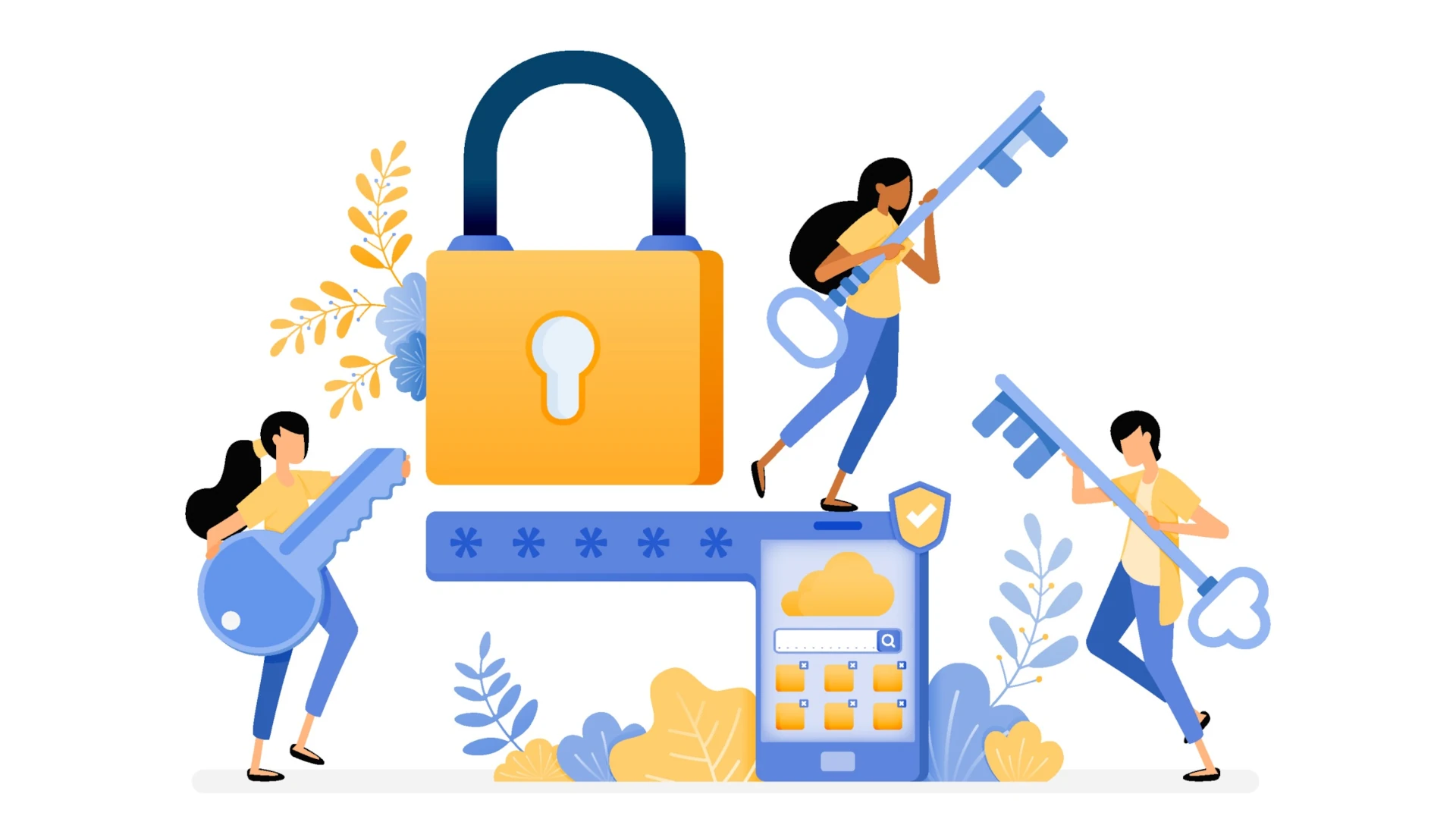
Use a good, reliable password keeper, and always enable MFA

You should never save your login information in browser. It’s not secure. These passwords are kept in a non-encrypted file on your computer and if hackers get a hold of it or if your computer gets lost or stolen, your accounts will be compromised.

Instead, use a reputable password keeper like LastPass or NordPass. These tools not only help you preserve your passwords, they can also create highly secure ones and alert you when your password is insecure or used on multiple sites.

MFA (Multi-Factor Authentication) can be annoying, but it should be enabled where possible to protect your account access. It’s good practice in your personal life and should be a requirement for all business-related accounts in your organization. At minimum, all of your staff, including leadership, should set up MFA for anything accessing sensitive cloud data (e.g. financial, patient EHR, student data, etc.) and email.

Set up and educate staff on standard company protocols

Are you familiar with the Green Dot bank payroll scam? It’s a common scam in which criminals spoof an employee’s email and send a request to HR or Accounting to update their direct deposit information, thereby stealing the employee’s salary.  Without proper procedures and safeguards, this type of scam is very easy to perpetrate.

Your cybersecurity protocols should set standards and expectations for how your company handles certain processes so that your staff members recognize when something is wrong. To make it clear that this is not just about bureaucracy and paper pushing, educate your staff on why these procedures are in place and underscore the importance of protecting themselves as well as the organization.

Train staff on how to respond to cyberattacks and refresh regularly

Your employees, interns, and volunteers don’t need to be experts in cybersecurity. They just need to be able to recognize when something looks or sounds wrong, and respond appropriately:

  1. Pause and take a breath. Don’t panic and don’t act rashly. Take a second to breathe through the initial shock so you can think clearly.
  2. Don’t engage with hackers. If you receive a message or phone call that you suspect is a scam, don’t engage. Take notes, screenshots, or photos of the initial interaction, and then end the conversation and contact your supervisor or IT team immediately.
  3. Don’t try to fix it yourself. If something goes wrong, don’t try to fix it. You might make the problem worse.
  4. Report immediately. It’s not about guilt or shame. Stuff happens, we’re all just human. The important thing is to contain the damage as quickly as possible. Don’t wait, don’t beat yourself up. Just report it ASAP and wait for further instructions.
  5. Share, learn, adapt. Once the security breach is contained and corrected, sharing what happened with your staff can help them avoid similar incidents in the future. Use what you learned to adjust your training and procedures to improve security going forward.


Need a little help?

If you need help drafting a cybersecurity policy or training guide for your organization, we can help. Contact us to schedule a free IT consultation to help identify the vulnerabilities in your IT infrastructure.
On AI and Cybersecurity

AI is having a much larger impact than most people realize, especially when it comes to cybersecurity. The same technology that security teams use to detect and respond to threats faster is also used by cybercriminals to craft more convincing scams, automate large-scale attacks, and find system weaknesses and Day One vulnerabilities. It’s an AI arms race and the target is your data.

Here’s what’s happening, why it matters to your organization, and what you can do about it.


The Dark Side

AI has taken social engineering to a whole new level. Classic attacks that used to be easy to spot and circumvent are now so sophisticated they can sometimes fool even pros.

Phishing Emails
Poor grammar and generic greetings are gone. Attackers can now use large language models (LLMs) to generate messages that are clean, relevant, and personalized to the recipient. They can even scrape the Web for publicly available content to mimic the writing style of a known contact.

Large-Scale Attacks
Everything from reconnaissance, to identifying system vulnerabilities, to launching attacks on an overwhelming scale can now be easily automated. What once would have taken teams of people weeks or months can now be accomplished in a matter of hours or even minutes by a single individual using widely available AI tools.

Deepfakes and Voice Cloning
AI can now generate audio and video of trusted individuals with uncanny realism. These deepfakes are so convincing that there are already several documented cases of employees receiving legitimate-sounding voice calls instructing them to transfer funds to or share credentials with a criminal enterprise. These types of attacks are difficult to spot and are growing in frequency.

Faster Exploitation of Vulnerabilities
AI is shrinking the time between a software vulnerability being discovered, and a patch being applied. Automated tools can now analyze vulnerability disclosures and generate working exploit code in a fraction of the time it used to take, putting pressure on organizations to patch faster than ever.


The Light Side

The same capabilities that make AI useful to attackers also make it a powerful defensive tool, particularly for organizations that cannot afford to staff a full internal security team.

Threat Detection at Speed and Scale
AI-powered tools learn what normal looks like for your environment and flag deviations in real time, catching threats that rule-based systems would miss. This is especially valuable for detecting insider threats, unusual data access patterns, and low-and-slow attacks designed to avoid detection.

Faster Incident Response
AI-assisted security platforms can automatically isolate affected systems, alert the right people, and begin documenting the incident, reducing the window during which an attacker has access to your environment.

Email and Endpoint Filtering
Modern AI-powered email security tools analyze sender behavior, link patterns, message structure, and contextual signals to identify malicious content before it reaches your inbox. Similarly, AI-enhanced endpoint protection can detect and contain malicious software based on behavior rather than waiting for a known virus signature to be matched.

Smarter User Training
Some organizations are now using AI to deliver adaptive security awareness training, presenting employees with simulated phishing scenarios based on the specific tactics that are currently trending. Rather than a once-a-year training video, employees receive ongoing, relevant practice that reflects actual attack patterns.


The Takeaway

Cybercriminals increasingly target small businesses, nonprofits, and local government offices because they tend to have fewer defenses in place. But don’t panic. There are steps you can take to keep your organization safe. Start with asking a few questions:

  • When did you last review your email security configuration?
  • Do your employees know what an AI-generated phishing email might look like today?
  • How quickly could your organization detect and respond to a breach?
  • Are your security tools and software patches current?

If you are unsure of the answers, that is worth paying attention to. For most small to mid-sized organizations, the highest-impact steps are straightforward:

  1. Enable multi-factor authentication across all business accounts and systems. They’re annoying, but they help a great deal.
  2. Keep software and systems patched and updated. This eliminates the majority of exploitable vulnerabilities.
  3. Review your email security settings and consider whether your current filtering is keeping pace with modern threats.
  4. Train your team. Not once a year, but regularly, and with current examples. Need to put together an AI usage policy for your organization? We can help! Contact us to request a free template.
  5. Work with a trusted IT partner who monitors your environment and stays current on emerging threats.

The best way to keep your data safe is to stay informed and keep pace with technological updates and advances. Awareness is half the battle. The other half is planning for failure and having a trusted partner to turn to in a worst-case scenario.

If you have questions about where your organization stands or what steps make sense for your environment, we are here to help.

Signs That May Indicate a Security Risk

When you get into established habits and routines, you may not notice subtle changes and warning signs of underlying issues until it’s too late. It’s always best to have a robust cybersecurity policy on the books, and to review it regularly with all staff and stakeholders. But in today’s age of AI tools and quick help shortcuts, the pressure to increase productivity while decreasing costs may lead to poor decision making that may expose your proprietary data to cybercriminals.

If it’s been a while since you reviewed your business tools and technologies, now is the time. Take a step back, and see if you notice any red flags. Here are a few signs to look for:


Employees using unknown or unapproved tools to streamline their workflow


“Work smarter, not harder,” as the saying goes. If the job gets done, what’s the problem? Well, the problem is that not every tool and app is safe to use, and even those that are can still be misused, creating major privacy and security issues not just for your business, but your clients and stakeholders as well.

Workarounds like this don’t mean your employees are careless. It just means you your systems aren’t meeting their needs. It’s important to ensure that everyone understands proper and improper technology use for work. But perhaps more important is to have a system in place that allows employees to raise technology issues, discuss options, and implement IT-approved solutions safely.


Your outdated software or systems no longer receive updates


Software vendors don’t support their products forever. Eventually, older versions reach “end of life,” meaning no more security patches, bug fixes, or technical support. When that happens, your existing technology becomes vulnerable to glitches and cyberattacks.

“If it ain’t broke, don’t fix it” may seem like a cost saving in the short term, but running these systems beyond their intended life cycle will cause costly, potentially catastrophic issues down the line.  If you’re still running these systems, you’re operating with known vulnerabilities that will never be fixed. And that risk compounds when these legacy systems connect to newer tools.

Audit your software and infrastructure regularly to ensure your technology remains up to date. If a major update is required, don’t leave it until a major disruption forces your hand. Plan a gradual phase-out of old systems before they become critical vulnerabilities. And always work with your IT team to test upgrades and replacements to minimize impact during the transition.


Loose or inconsistent data access rules

You wouldn’t just give a stranger the keys to your house. The same rule applies when it comes to who can access sensitive data and when. Access control vulnerabilities happen when:

  • Permissions are never reviewed or updated when employee roles change
  • Shared accounts or generic logins are used across teams
  • Onboarding and offboarding processes don’t include access audits

Implement role-based access controls and establish a regular review process. Encourage and enable individual rather than shared logins, and the use of password keepers that auto-generate strong, secure passwords. Always audit access points and rules when someone is onboarded, offboarded, or changes roles within the company. Enable multi-factor authentication (MFA) where available to add a layer of protection.


Your Systems Don’t Talk to Each Other—or They Talk Too Much


Integration issues create security risks. When systems aren’t properly integrated, manual data transfers (copying, exporting, manual entry, etc.) increase the risk of errors, leaks, and exposure. When too much unnecessary data is shared between systems without proper controls, a breach in one area can snowball across your entire system, and one compromised account can become a gateway to everything else.

Map out and conscientiously plan your data flows. Understand where information comes from, where it has to go, and how it needs to get there. Are those connections secure? Is the data transfer needed in the first place? Automate data sharing within controlled environments as much as possible. This not only reduces risk, it also improves workflow efficiency.


You don’t know your company’s IT policies

If someone asked you right now, “How often is the database backed up?” or “Who all has access to the accounting system?” could you answer confidently?

If you don’t know, or need to run reports or consult with someone to find out, you have a problem. When you don’t have clear insight into the systems and IT structures that keep your business running, you can’t tell if or when something becomes an issue. You’re flying blind.

Invest in monitoring and logging tools that provide real-time visibility into your information systems. Establish regular reporting on access, backups, and system health. Make sure someone on your team owns security oversight and knows how to interpret the data.

None of these warning signs mean your business is doomed or that you’ve been negligent. But ignoring them won’t make them go away. If you have concerns about your business systems, whether it’s efficiency or security, Nerd Crossing can help. Sometimes, taking an honest look at what works and what doesn’t can expose opportunities for streamlining and growth. Let’s talk.

Zen and the Art of System Updates

Android phone in update mode

You wouldn’t skip oil changes for your car and expect it to run smoothly. The same applies to the technology you and your business use every day. System updates often feel like an interruption to your work, but they are essential for keeping your devices running smoothly.

What Regular Updates Do

Improve security:

Cybercriminals are constantly evolving new ways to infiltrate your systems and steal your data. The advent of artificial intelligence (AI) has accelerated the development of new scams and malware, and regular system updates are vital for keeping businesses safe from cyberattacks. When a vulnerability is discovered, tech companies and vendors use these updates to release patches that seal those weak points and protect your systems—and, more importantly, your data.

Improve performance:

Is your device running slower than usual? Does it take longer to start up? Odds are, there is a system update waiting in the wings to fix it for you. These updates aren’t just for security. They also fix bugs, optimize operations, and tweak your system to help it run smoother and faster.

Fix compatibility issues:

As new apps, devices, and integrations are released, your operating system needs to keep pace. Regular updates ensure that your technology continues to play well together and you avoid any potential issues that may bring your operations to a standstill.

When was the last time you dusted off your technology?

Most consumer-level devices these days have automatic update capability. Enabling this feature is the best way to ensure that your device continues to function correctly and securely. If you can’t allow your device to shut down or restart for these updates during the workday, you can set the automatic update to take place outside of work hours. These small habits will make a big impact on your technology usage.

The same applies to businesses and organizations, too. Most small businesses and many large businesses rely on employees using personal devices to perform their duties, whether they work at the office or from home. Regular, automatic updates should be company policy for all business-related technologies.

Need some help keeping your company up to date?

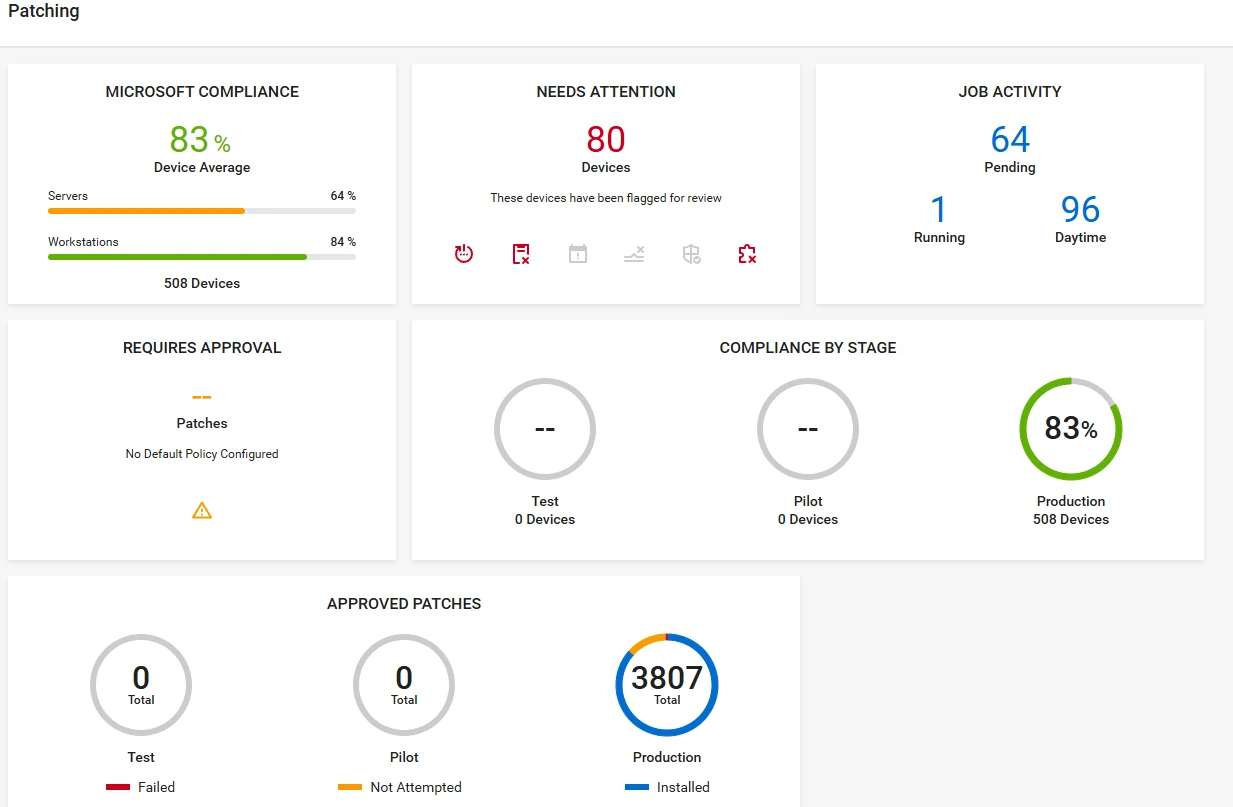
systems update dashboard screenshot showing multiple metrics and status callouts

When it comes to balancing the need for maintaining security and minimizing service disruption, things get a little more involved. You don’t want to cause major issues for your organization. Nerd Crossing can help! Technology updates are included as part of our Maintenance Plans with an automated patch management system that keeps our clients’ systems secure and running smoothly. Want to know more? Let’s connect and chat about what you need, and how we can help you make it happen.

IT for Healthcare

Properly-managed cybersecurity & information technology is critical to the medical field. HIPAA compliance needs to be deep-rooted in all aspects of your technology. To protect yourself, your company & your patients, use an information technology & cybersecurity firm that specializes in the medical industry.

Cybersecurity

A data breach could be devastating to your practice. Cybersecurity services include encryption, security audits, vulnerability scanning, security management, & more.

HIPAA Compliance

We specialize in HIPAA- compliant cloud services, security risk assessments, training, HITECH ACT, & more. We educate ourselves frequently in medical tech.

Disaster Recovery

Our technicians will assess your technology, create a HIPAA-compliant solution to help protect your data & business in case of a disaster, & then deploy it.

Cloud Services

It is now crucial for those in the medical field to utilize HIPAA-compliant cloud storage for their patients’ & administration’s data. We can help find the best cloud services for you.

Project Management

We help identify technological problems, provide researched solutions, implement risk management, & help medical facilities run smoothly & securely.

Onsite & Device Support

We can set up & maintain your computers, printers, servers, mobile devices, networks, & more so you can instead focus on your patients, not your tech.

The Importance of Data Backups

We can’t stress enough how much data backups are crucial for businesses of all sizes. Data is often considered the most important element for small to medium enterprises. And there’s no doubt that it’s an absolute necessity for enterprise corporations. Protecting your data is not only protecting your company’s past, present and future, it is protecting your customers’ as well. There are so many ways that companies can lose data, so it’s important to always have backups of all information.

data backups

Continue reading “The Importance of Data Backups”

Cybersecurity and Your Business

Properly maintained cybersecurity is imperative for businesses of all sizes. Whether you’re an enterprise corporation or a mom-and-pop shop, as long as you use the internet, you and your business are susceptible to being hacked. Hackers can not only access your business’s financial information, but your customers’ as well. Even if your company has its own IT department, many businesses do not focus their technology on cybersecurity. According to a recent survey, 75% of IT professionals admitted they did not have a formal cybersecurity response plan at the company they work for; 66% weren’t confident in their company’s ability to recover from a cybersecurity attack.

cybersecurity

Our IT Nerds make cyber security a top priority for all of our clients, including schools, government agencies, car dealerships, and other small-to-medium businesses. We also provide large corporations with supplemental IT security support as well. We are constantly researching the latest news and information about hacks, IT security, government standards, and more, so that we can provide our clients with the latest in cyber security solutions. The National Institute of Standards and Technology is frequently releasing updated guidelines in risk assessment that requires continuous monitoring.

There are also many different elements to cybersecurity that we keep in mind when offering our IT solutions, while many other information technology companies just focus on one or two elements. Application security, operation security, disaster recovery, end-user education/training, information security, and network security are the main factors that we keep in mind when providing cyber security solutions to our clients. However, we understand that every business is different and may requires certain components, such as certifications or HIPAA compliance.

At Nerd Crossing, we provide the San Francisco Bay Area with diligently constructed cybersecurity solution packages. For more information on how we can help your business or nonprofit, or to receive a free cybersecurity consultation, please do not hesitate to contact us.


Windows Support Scams


windows support scams

The most common issue we are hearing from our residential clients is regarding Windows Support Scams. Has this ever happened to you? We present, below, a possible scenario of this occurrence:

Continue reading “Windows Support Scams”

The Importance of Encryption

Many companies with 1099 independent employees have recently mandated that business devices must be encrypted to safeguard customer and company data. Encrypting and protecting this data is imperative to keeping your business, customers and job safe. Even if the company you work for has not mandated this policy, what would happen if your work computer, laptop, phone, tablet, or storage device was stolen? What if your confidential customer data got into the wrong hands?

Continue reading “The Importance of Encryption”

The Future of Vehicle Hacking

Earlier this year, a writer from Wired participated in an experiment with two hackers. In it, they were able to remotely access his Jeep Cherokee, change his radio stations, use his windshield wipers, and even cut off his acceleration.  Continue reading “The Future of Vehicle Hacking”